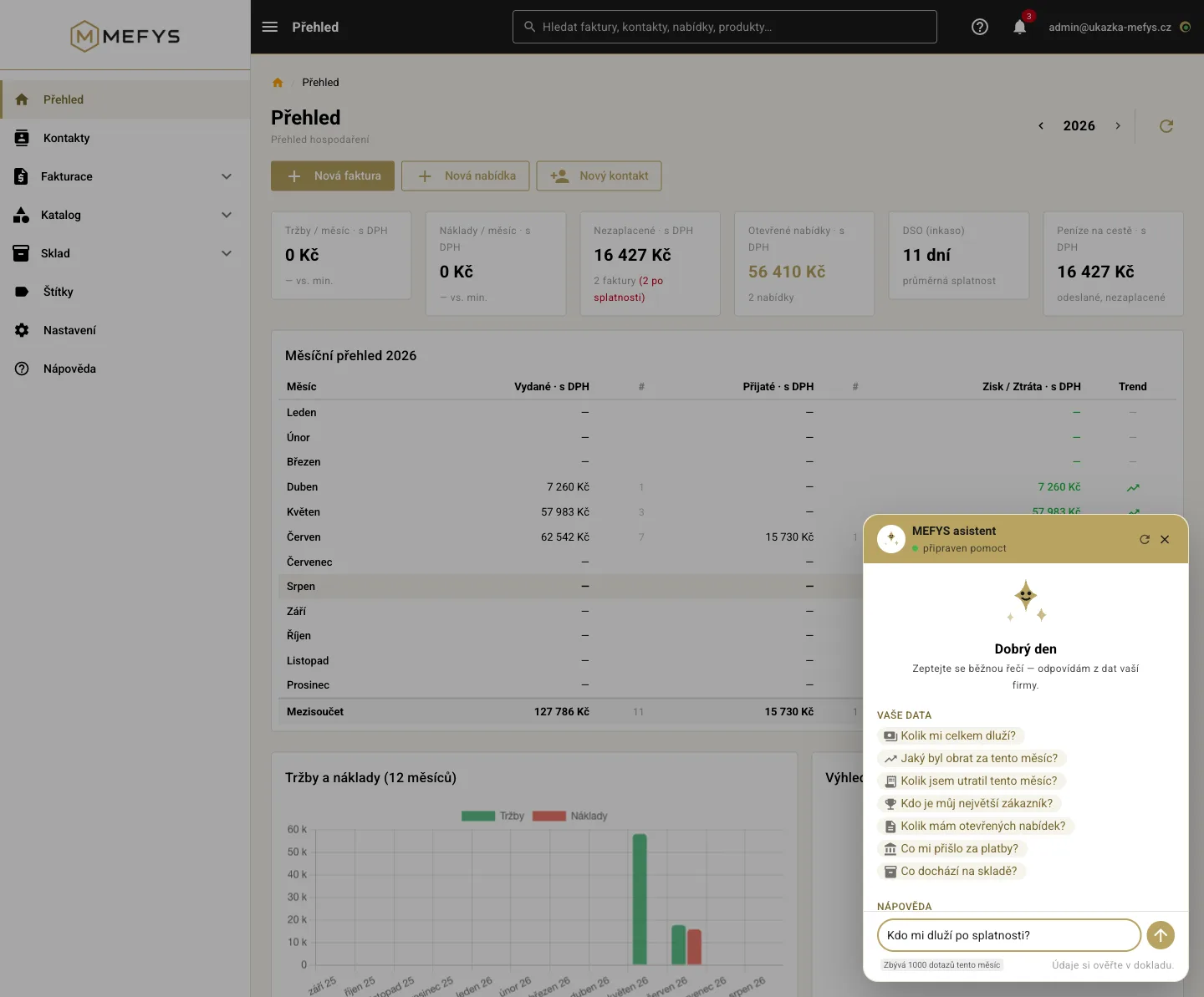
Open MEFYS, click the bubble in the bottom right and ask in plain language — “who owes me in total?”, “what was my revenue this month?”, “how do I issue an advance invoice?”. No forms, no setup. The assistant answers from your company’s data and from the help.
No setupAsk in plain languageRead-only, deletes nothingIncluded in your planData in the EU
Most tools hide “AI” somewhere in the settings, or only around invoicing. In MEFYS the assistant is right inside the app — a chat in the bottom right. Nothing to connect, no keys to paste: open MEFYS and ask. It answers across your whole business — invoices, inventory, contacts and overviews — and helps with how to use the system, too.
Ask in plain language
Who owes me in total?
MEFYS: You’re owed CZK 200,000 incl. VAT in total — one invoice overdue since 21 Dec 2025. Would you like to open it?
What was my revenue this month?
MEFYS: I’ll list this month’s revenue and compare it with last month.
What’s running low in stock?
MEFYS: I’ll show the items below their minimum level and the current stock.
How do I issue an advance invoice?
MEFYS: I’ll walk you through it from the help and point you to the right section.
What you can ask
Your data — across the business
Who owes you and what’s overdue
Revenue and your business overview
Stock levels and what’s running low
Contacts and their documents
Invoices, quotes, payments, reminders
Help — how to do things
How to issue an invoice, credit note, advance
How inventory or price lists work
How to set up reminders
Where to find things in MEFYS
Advises and points to the right help section
The in-app assistant only reads and advises — it issues, sends and deletes nothing. It’s the safest way to get an answer, and it sees only what you have access to.
Open the assistant inside the app and ask in plain language — it answers from your data and the help.
Snap a document. MEFYS types it up
The other half of MEFYS AI also works right inside the app: upload or snap a received invoice or receipt on your phone (PDF, JPG, PNG) and MEFYS extracts the supplier, amounts, VAT and line items itself. The result is a draft of a received invoice for approval — with the original attached to the document. You can upload several at once — MEFYS processes them in a batch and prepares a separate draft from each.
Nothing is posted automatically — a typed-up document is always just a draft that you check and approve.
It checks itself — MEFYS verifies the supplier’s company ID in the ARES register, re-calculates VAT and compares the amount with the QR code on the document. If something doesn’t add up, it flags it right on the draft.
ISDOC free and unlimited — electronic ISDOC invoices are imported instantly, accurately and don’t count toward the monthly total.
AI transcription (document extraction) is included in every plan: Start 20, Standard 50 and Business 150 documents a month; Free 3 to try out (one-off). Need more? A pack of +100 documents (non-expiring credit) can be added right in the app — on any plan, including Free.
Safe by design
Read-only — the in-app assistant issues, sends, transfers and deletes nothing. You ask, it answers.
Sees only yours — it answers only from your company’s data and only within your permissions.
Data stays in the EU — separated from other companies, with encrypted transfer and two-factor sign-in.
Verify in the document — for accounting decisions the source of truth is always the document itself; the assistant helps you find your way around the data.
The in-app assistant is part of the paid plans. On Free you can try it with 20 queries a month (Start 100, Standard 300, Business 1000).
Want to control MEFYS from your own AI?
Besides the in-app assistant, MEFYS also offers a more advanced path: connect it to your own AI assistant (e.g. Claude) via the open MCP standard. You then run all of MEFYS from your AI client — and can also have AI prepare an invoice or quote draft for approval and create or edit a contact.
Create an access key in Settings — a few clicks, ideally with a “read-only” role. The key works like a password just for the assistant and you can revoke it anytime.
Paste the address and key into your assistant — enter app.mefys.cz/mcp and paste the key. No coding, done in minutes.
Run MEFYS from your AI — read data and have document drafts prepared for approval.
Preparing invoice and quote drafts is available from the Standard plan up; every change via AI is traceable (who, what, when) and nothing can be deleted via AI.
Who it’s for
For anyone who’d rather ask than click through — a sole trader who wants to know “who owes me”, and a company that needs a quick overview without opening five reports. The assistant is right inside the app, so there’s nothing to set up. And because you run MEFYS in the browser and on mobile as usual, AI is a bonus, not a requirement.
Try MEFYS with the AI assistant
14 days free, no payment card. The in-app assistant is part of the paid plans, a taster on Free.
Technical note: the in-app assistant answers from your data using a language model; for accounting decisions the source of truth is always the document itself. The advanced connection to your own AI works via the open MCP standard (Model Context Protocol), so MEFYS works with any assistant that supports it (today, for example, Claude). AI control is an add-on — you run all of MEFYS without it, in the browser or the mobile app. The range of features available via AI may expand over time.